
Mailing Operations Committee

The steps needed to send mailings to groups of members via the US Postal Service are given below.

Overview

During the year the Association sends various mailings to members via US mail. The common mailings are for the Board Ballots, the membership renewal letters, and the three times a year Prime Times. The Mailing Operations Committee (MOC) processes these mailings.

Sometimes mailing lists are sent to other organizations, normally after approval by the President. A list of current members may be sent to ASU for use in the annual ASU United Way Campaign without special authorization each year.
Procedure - membership drive

The membership drive is the most complicated mailing, so it has its own page of instructions.

Go to membership drive instructions

Procedure - other mailings

All mailing lists are generated using Wild Apricot searches. There are saved searches for ballots (Board, Bylaws, any other membership voting), membership renewal notices, Prime Times and the ASU United Way. For other mailings the person requesting the mail will need to supply the search details (see "Create new simple distribution list" for help in creating the search).

Follow these steps to generate a mailing list:

  • Log in to Wild Apricot
  • Make sure you are in Admin view. You can tell whether you are in Admin or Public view by looking at the button in the upper right. The button is labeled with the view you would switch to if you click on it, so, probably counter-intuitively, if the button says "Public view" you are in Admin view, and vice versa. If it says "Admin view", click on it to switch.
  • Click on Contacts - Saved searches from the menu on the left.
  • Locate the desired saved search(s):
  • Once you have selected the saved search click on the "Run" button and note the number of members. Finally click on the "Export" button. In the "Export contacts"  popup window select: 
    • First Name
    • Last Name
    • Street Address
    • City
    • State or Province
    • Zip or Postal Code
  • Click on "Export" at the bottom of the pop-up window
  • Rename the file to something you will recognize, e.g., BallotMailingList, and save the file to a location you can later find. 
  • Click on the Personify logo in the upper left to restore the menu.

You need to collect two types of materials for each mailing: the material to be mailed and the envelopes required, if any.

Collect PDF versions of all documents to be mailed.

  • The Board ballot will be sent by the Chair of the Board Nominating Committee, i.e., the Immediate Past President. Ballots for anything else, such as a bylaws update, will be sent by whomever has been authorized to prepare the ballot.
  • The Prime Times editor typically takes care of providing the content for each issue to the printer, i.e., Alphagraphics, so the MOM skips this step for Prime Times.


  • ASU's United Way campaign does the actual mailing, so there are no documents to gather for that.

Check supplies of any required envelopes or shells:

  •  Ballots require inclusion of a self-addressed return envelope as part of the package. Outer envelopes have ASURA's return address.
  • A supply of both of these envelopes (outer and self-addressed return) is kept in ASU Mail Services. You can check with our mail processing contact to find out if there are enough on hand for this mailing. Also check with the ASURA Office Coordinator to see if there are spares in the office that can be sent to Mail Services. If not, order more envelopes, or ask the Financial Operations Manager to do so. If you order the envelopes yourself, please be sure to provide a copy of the invoice to the Financial Operations Manager. Also it is a good idea to let the Office Coordinator know about the order, as it sometimes happens that the delivery doesn't go to Mail Services as planned, but goes to the ASURA Office.
  • Prime Times does not use envelopes but does use shells that are printed by and kept at Alphagraphics. The Prime Times editor is responsible for making sure that Alphagraphics has enough for the Prime Times mailings.

ASURA uses Alphagraphics on University in Tempe to print documents that are to be mailed.

Send documents to be copied and mailed to Alphagraphics by email. See the Helpful people page for the Alphagraphics contact. In your email include the following information. (For Prime Times, this step is completed by the Prime Times editor.)

  • The number of copies to print. Round up slightly from the count that you actually expect to be mailed, just in case some get spoiled at Mail Services.
  • The color of ink and the color of paper. This will be black ink on white paper.
  • Double or single sided. Use double-sided where this is logical, e.g. for the Board ballots.
  • Special directions, e.g., collate, fold, etc.

In the email you should also request that Alphagraphics:

  • Send the printed documents to ASU Mail Services
  • Send you the projected date the copies will be sent to Mail Services
  • Send the invoice to the Financial Operations Manager. Copy the Financial Operations Manager on the email so they will be aware that an invoice will be coming.

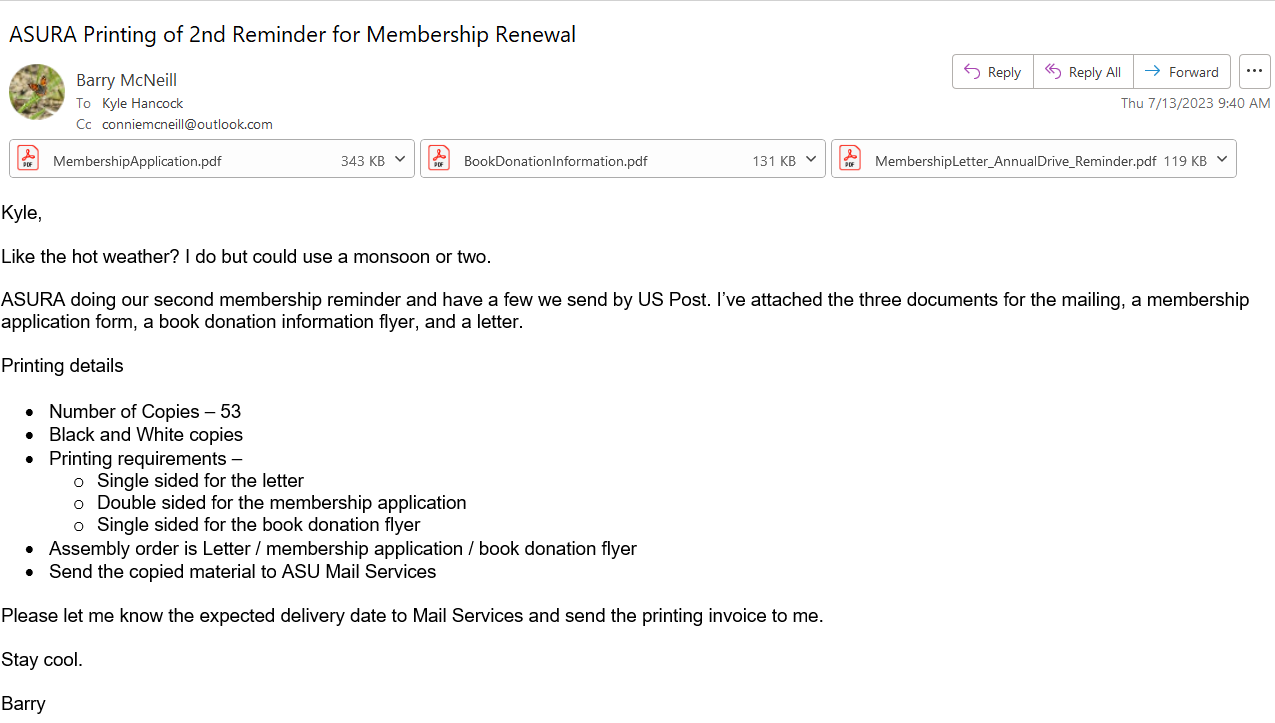
Sample email to Alphagrahics

A sample email to Alphagraphics

ASURA uses ASU's Mail Services to mail print materials.

You must complete a Mail Services online work request form for each mailing. You will need to know the date that AlphaGraphics will deliver materials to Mail Services before completing this form. Note: You must have your ASURITE User ID and password available to use this form.

Mail Services request form

The following documents contain all the information you will need to complete a form for each type of mailing.. 


Updated 10 Dec 2025 by Connie McNeill